How it works
Four stages, one checkpoint that matters, and everything around them.
This page is the walkthrough. It follows the order you would meet things in the product: setting up, signing in, then the four stages of a scan, then what happens afterwards. Where the run produced a screen for a step, the screen is here.
Before the first scan
Set up an application.
Everything Correctest knows is scoped to one application: its Knowledge Base, its documents, its logins, its scans, its generated suite. Setting one up is one short form: a name, the address Correctest explores, and, optionally, where its sign-in page lives. Once it's saved, every other screen quietly uses it; you are never asked again.
The address may include a path. An application living under https://company.example.com/portal/ is identified by that full prefix. Scans start there and the crawl stays inside it: a link to the same host but outside the root, say the company blog, is not followed, which protects both your scan budget and your Knowledge Base from out-of-app pages. Two applications can share one host under different paths.
The sign-in page is optional, and never guessed. Plenty of applications have no login at all, so it isn't forced. But Correctest never quietly assumes the application URL doubles as the login page either: a guess that looks like a setting is worse than a blank. If it's blank and a scan later needs to sign in, Correctest says so at the start rather than walking around unauthenticated. A mistyped sign-in page can be corrected on the application screen afterwards.
One environment per application, for now. Multiple environments per application is a later change to the same control, not a redesign. PLANNED
There is nothing to install. Correctest is a cloud service; the only thing you download is the generated test project at the end.
What "an application" holds
- One environment: the address explored, and optionally its sign-in page
- The logins you save for it, by role
- The documents you upload for it
- Every scan, and the Knowledge Base that accumulates across them
- The generated test suites
- Its own credit allowance and licence
Logins and roles
Hand it a login once. It proves the sign-in before it spends anything.
Most real apps are auth-gated. You save your logins once on the application's Credentials page, then simply choose one when you start a scan.
- Saving a login
- Add a role (say "Adviser"), then type its password into a masked field. It goes straight to encryption; nothing anywhere ever shows it back to you again. The screen only ever tells you whether a login is on file or missing. Rotate or remove it whenever you like. A role can hold two separate logins, which is how you check that one user can't see another's data.
- Using it
- On New scan there is a "Sign in as" choice listing the logins you've saved. Leave it on "Don't sign in" and the scan explores as a signed-out visitor. Pick a role and the scan signs in as that role first, so it can see everything behind the login wall. When the stories you're scanning name a role you have a login for, the control already starts on that role, with a line saying why.
- Proven before the exploring starts
- A scan that is supposed to sign in doesn't take your word for it and find out later. It goes to the sign-in page first, signs in, and only then begins exploring. If the sign-in fails, wrong page, rejected credentials, no form where one was expected, the scan halts immediately, having used roughly the cost of looking at one page, and says in plain language what happened. You choose: try again, continue without signing in (public pages only), or abandon. No default, no timeout; every one of them is your act.
- Try again is the repair
- Fix whatever stopped the sign-in, the details or the sign-in page, and press Try again on the same halted scan. You don't start over. A scan that ran without its sign-in says so everywhere: the overview, the review screen, the needs-attention list, even the generated project's README.
- Behind the scenes
- Correctest fetches your saved login at the moment the scan starts, decrypts it in memory, and hands it privately to the scanning process. It never travels as a command-line argument, is never written to a file, and never appears in a log line. The log records the name of the role and which fields were supplied, never a value.
- Getting behind the login wall
- With credentials, discovery runs in two passes: an anonymous pass over everything reachable without signing in, then an authenticated pass that logs in once, keeps the session alive, and maps the pages an anonymous visitor never sees. When a flow bounces to a login screen or an access-denied response, Correctest retries it with the held session; that detection is empirical, never guessed from the page's appearance. A flow that genuinely can't be reached even when logged in is recorded honestly as such.
- When your login isn't a plain password form
- Authenticator-app codes: share the test account's setup secret and Correctest computes the six-digit code itself, at scan time and again in the suite it generates, so your CI can log in too; the secret is encrypted like a password and never written anywhere. Single sign-on, SAML, push approvals, magic links and bot checks are deliberately not driven; Correctest recognises the shape and records it as an observed fact ("this login presents a single-sign-on control") so you know why a run stayed shallow. And there is still a way in: log in by hand once, export the browser session, and point the scan at it. The generated suite carries the same documented setting so your CI can supply its own session.
- Seeing the difference between roles
- One scan signs in as one role. Scan as several and the Persona coverage view shows every flow Correctest found and which roles' scans found it; a flow found by admin but not viewer is the role-gated surface, highlighted for you. Correctest observes the difference; it never asserts which role should see a flow. Multi-role in one go: PLANNED
Stage 1
Discover: it explores your app the way a careful new hire would.
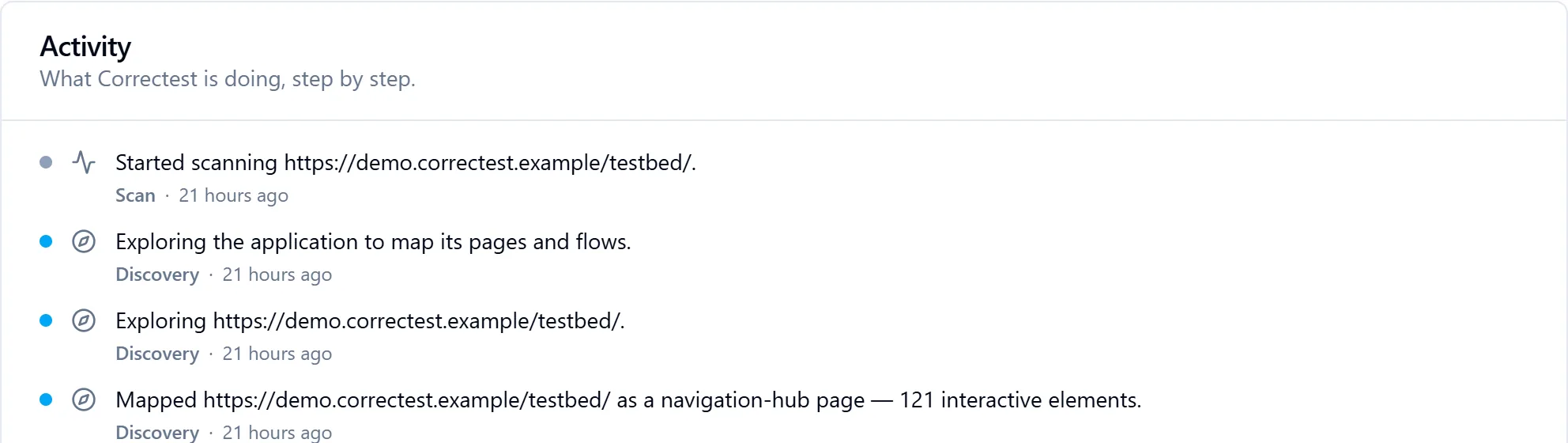
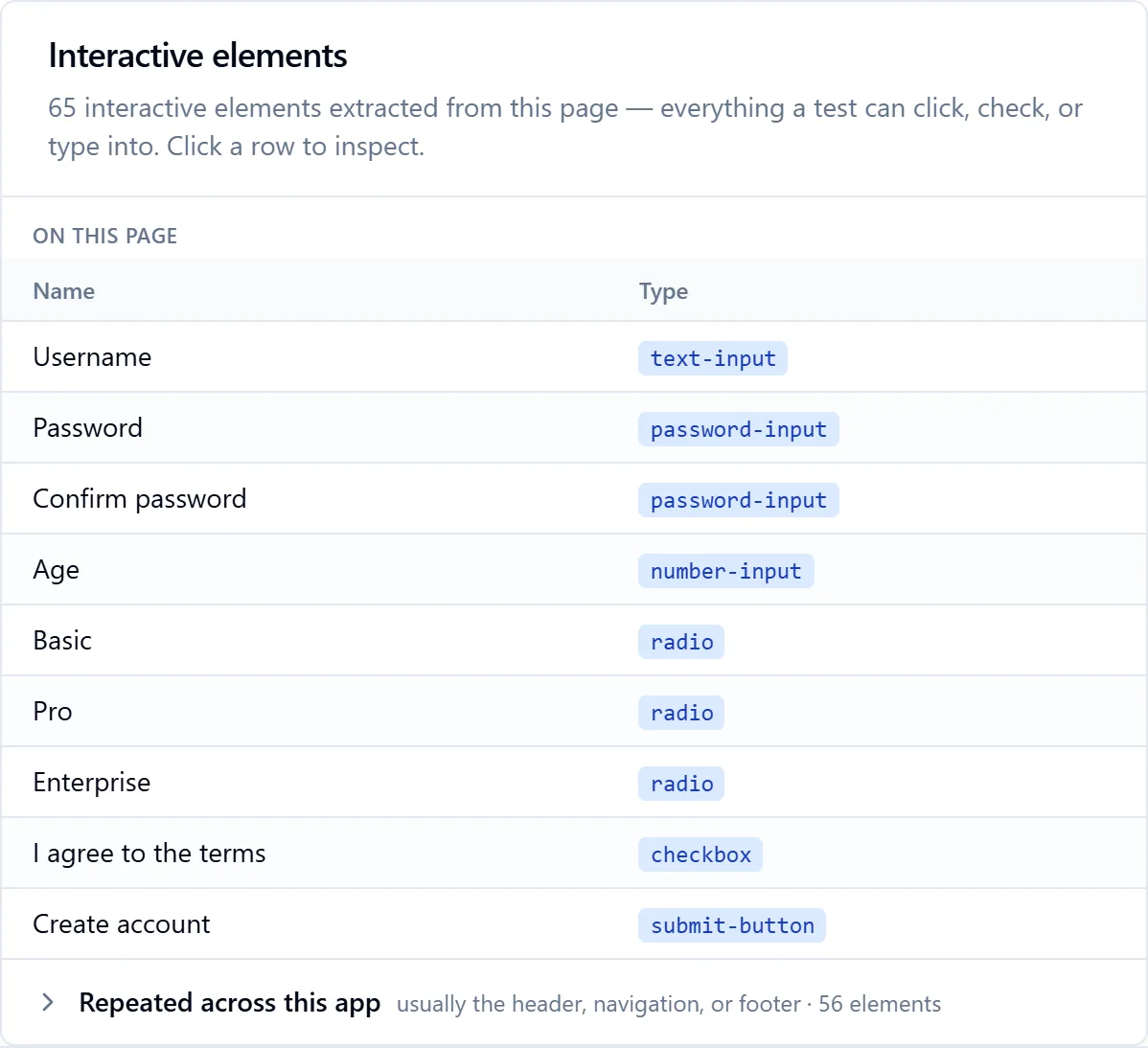
A browser agent walks the app from its entry address, following links and interactive triggers. Per page it says what the page is; per element what kind of control it is and what it's for; per field what valid data looks like and what should fail. For each form it makes one valid submission to prove the path is real, and that path becomes a flow: a multi-step recipe for using that form.
What it records
- Pages, classified into one of 13 roles (login, registration, dashboard, checkout, settings, listing, detail and so on), down to a deliberate "unknown": no page is ever force-fit into the wrong role or dropped for being ambiguous. Every role carries a confidence score and, where the AI wasn't sure, its reasons.
- Elements with a bundle of selectors: the accessible, Playwright-idiomatic form first; where that matches more than one element, a structural fallback that pins exactly one, so a selector blessed at scan time behaves the same in your CI.
- Test data: one valid value and a set of invalid ones per field, each with a written rationale. Pages that only exist after an interaction, a field revealed by ticking "I am a business", an input injected by choosing "Other", are found by interacting with the triggers, and the reveal is recorded so the generated test can reproduce it.
- Silent rejections: a background request that returns an error for a value the browser accepted without a banner is caught by watching the network, recorded, and surfaced for you rather than auto-corrected.
- Flows: named, described in business language, given a criticality with a rationale, and a confidence score.
Two honesties built in
- A page that never settles, a live ticker, an endless loader, is given a time budget, recorded as timed-out, and the crawl moves on. One page can never stall the scan or drain the budget.
- A page whose harvest is cut short is marked incomplete, so a later story can never falsely report "this field isn't here" about a field the scanner simply didn't reach.
Upload user stories and discovery can be story-guided: the story is the map, and Correctest walks each story's steps live, reaching the deep states a link-following crawl never sees. How story-driven scanning works →
Flows are replayed in parallel, and it changes nothing but the clock
Pages are processed concurrently and pending flows run through a bounded pool, so a large application does not take proportionally longer. Concurrency is held to a determinism guarantee: running in parallel changes the wall clock, never what is discovered.
Stage 2 paused for you
Review: the pipeline stops and hands you the wheel.
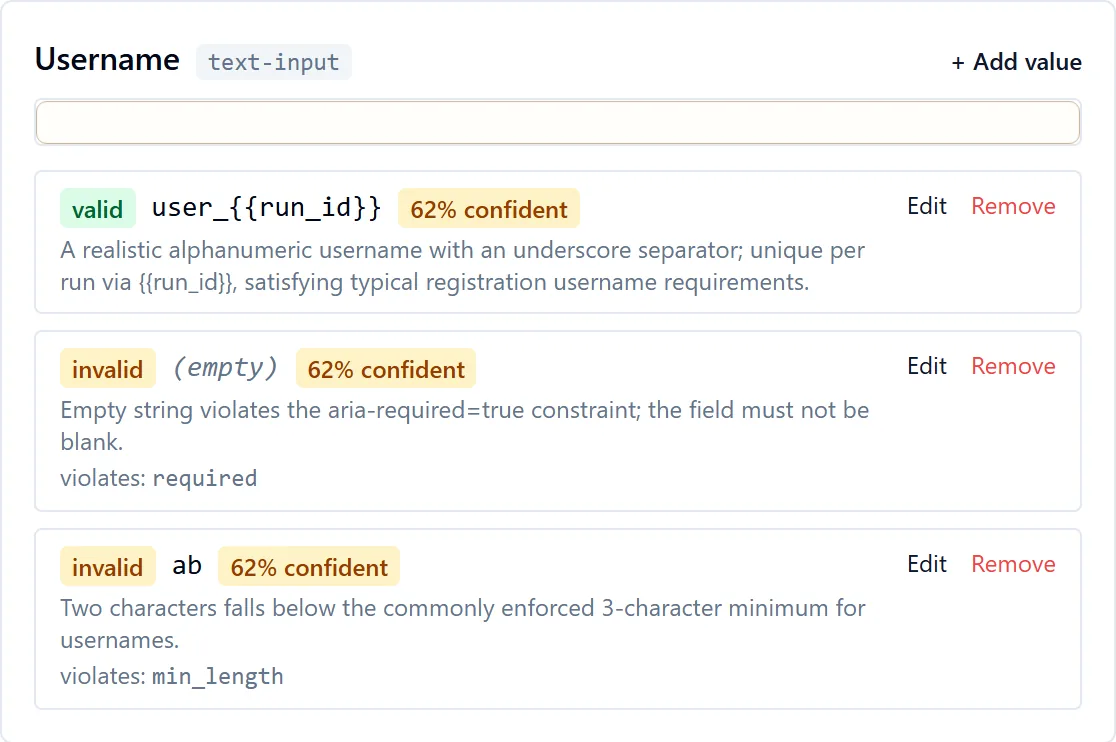
Before a single form is submitted the scan reaches a "paused for review" state: here is the valid and invalid data I imagined for each field; change anything before I submit it. Every field, grouped by page, with the AI's prepared values and its reasoning. You can add a value, edit one, or remove one you don't want tested. When satisfied, "Continue with execution" submits the set you approved.
Edits never lose the original
When you change a value, Correctest does not overwrite what the AI proposed. It records your value as a new entry and marks the AI's as superseded, so the screen can always show "AI proposed X, you changed it to Y", and the generated tests and the audit trail keep both.
What is flagged for you
Low-confidence values are highlighted on the review screen ("3 values have low confidence — worth a look before you run" was the message in our own run). A dedicated Needs attention queue collects everything the scan wasn't sure of, across seven categories: application findings, replay failures, fields it couldn't infer a value for, low-confidence flows, silently rejected values, revealed required fields the test doesn't cover, and low-confidence page roles. Each card links to the evidence.
You can answer it directly
For a field the scanner couldn't crack, you type the right value inline; once corrected fields map to a flow, "Re-walk N flows" re-runs just those in a new snapshot with your values, leaving the original scan frozen. Items not worth acting on can be dismissed, reversibly.
Stage 3
Replay: it submits, and writes down what the app said.
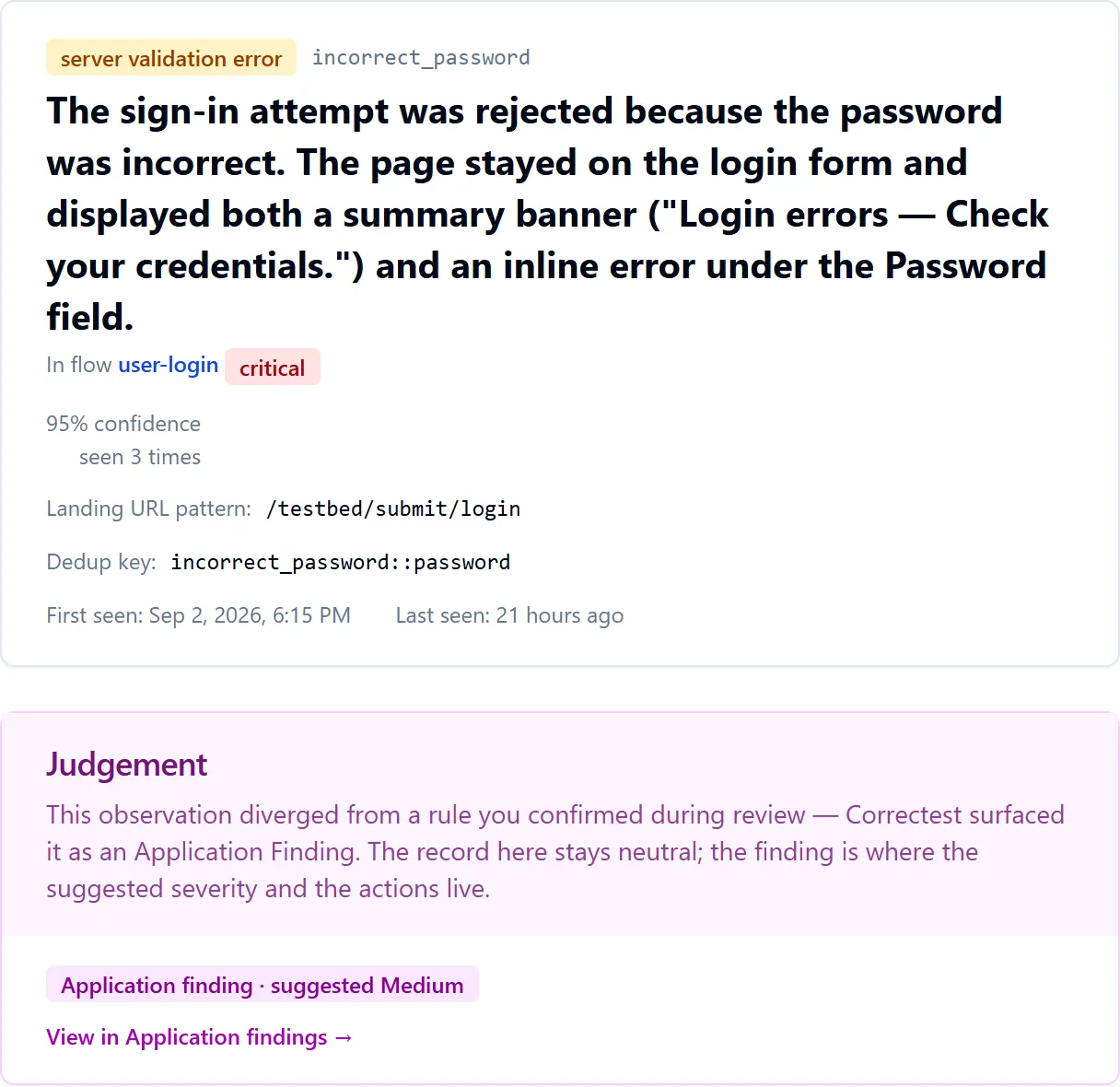
Every walkable form gets its ordinary happy-path submission first, deliberately recorded. Then the invalid variants, as many as the replay depth you chose. For each submission Correctest captures a before-and-after screenshot pair with credential fields masked, reads the app's own error text, and interprets the outcome into a structured observation: what kind of outcome, which messages, which fields were flagged, how confident it is.
Observations are knowledge, not logs
The same validation rule shows up in many places, so observations are de-duplicated by rule and field. One observation may back several tests. The view records what the app did; it adds no pass/fail verdict. A Judgement column explains why two identical outcomes can mean different things: one flagged as a finding because it diverged from a rule you confirmed, the other quiet because the app reacted exactly as that rule predicts. Both are explained inline, never left as a coincidence.
Did that value test the rule we meant to test?
During preparation Correctest guesses which rule each invalid value should provoke ("abc" should trip the password-too-short rule). Sometimes a different rule fires first ("Password must include a number"). Each pair is checked, and a value that exercised a different rule than intended is excluded from generation and surfaced for you, so the suite never claims to test a rule that was never actually exercised.
Where a submission lands, that page becomes knowledge too
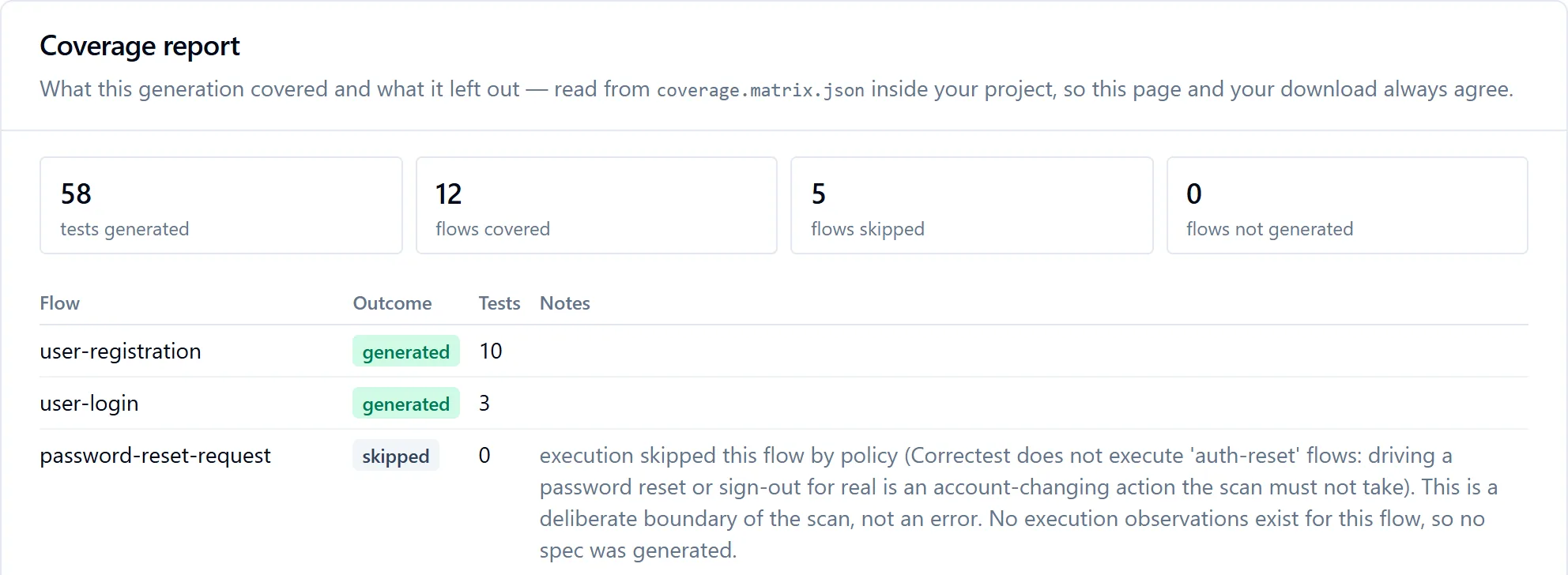
A success banner, an error screen, a confirmation step: the landing page is captured and its elements inventoried, so the generated page object for that destination carries real locators, not an empty shell. Passwords resets and sign-outs are deliberately never driven for real; doing so would send emails or end sessions.
Between replay and generation
What the scan can tell you before any test exists.
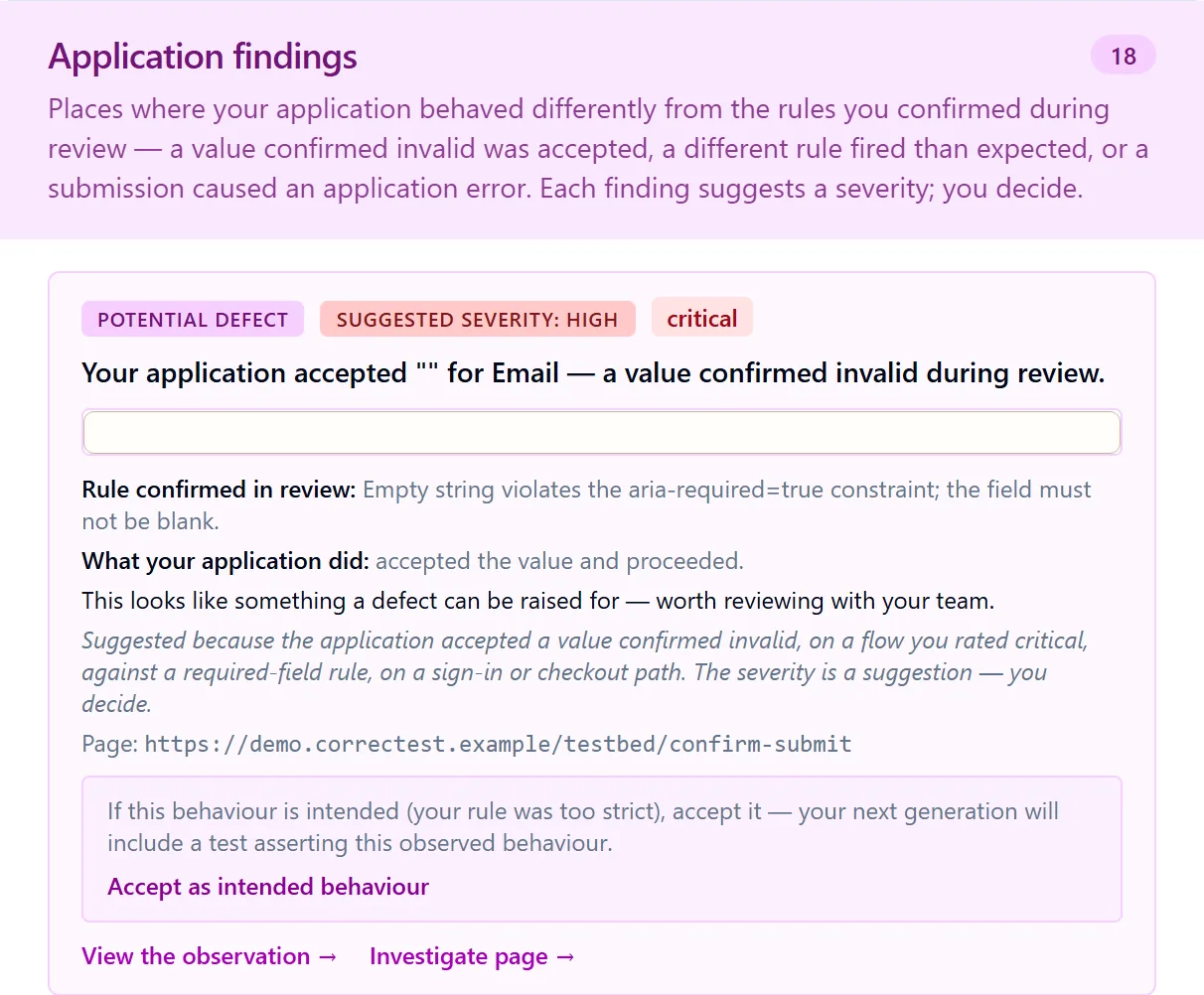
Every place where the app's behaviour diverged from the rules you confirmed during review is surfaced as a first-class application finding the moment execution completes. Each says, in plain words, what was expected (your own confirmed rule), what the app actually did, who authored the value, and carries a suggested severity derived from your own flow criticality and the kind of divergence, always labelled "suggested — you decide". These are the kind of behaviours a defect is typically raised for, found before a single test was generated.
The post-execution review has two lanes, and a symmetry
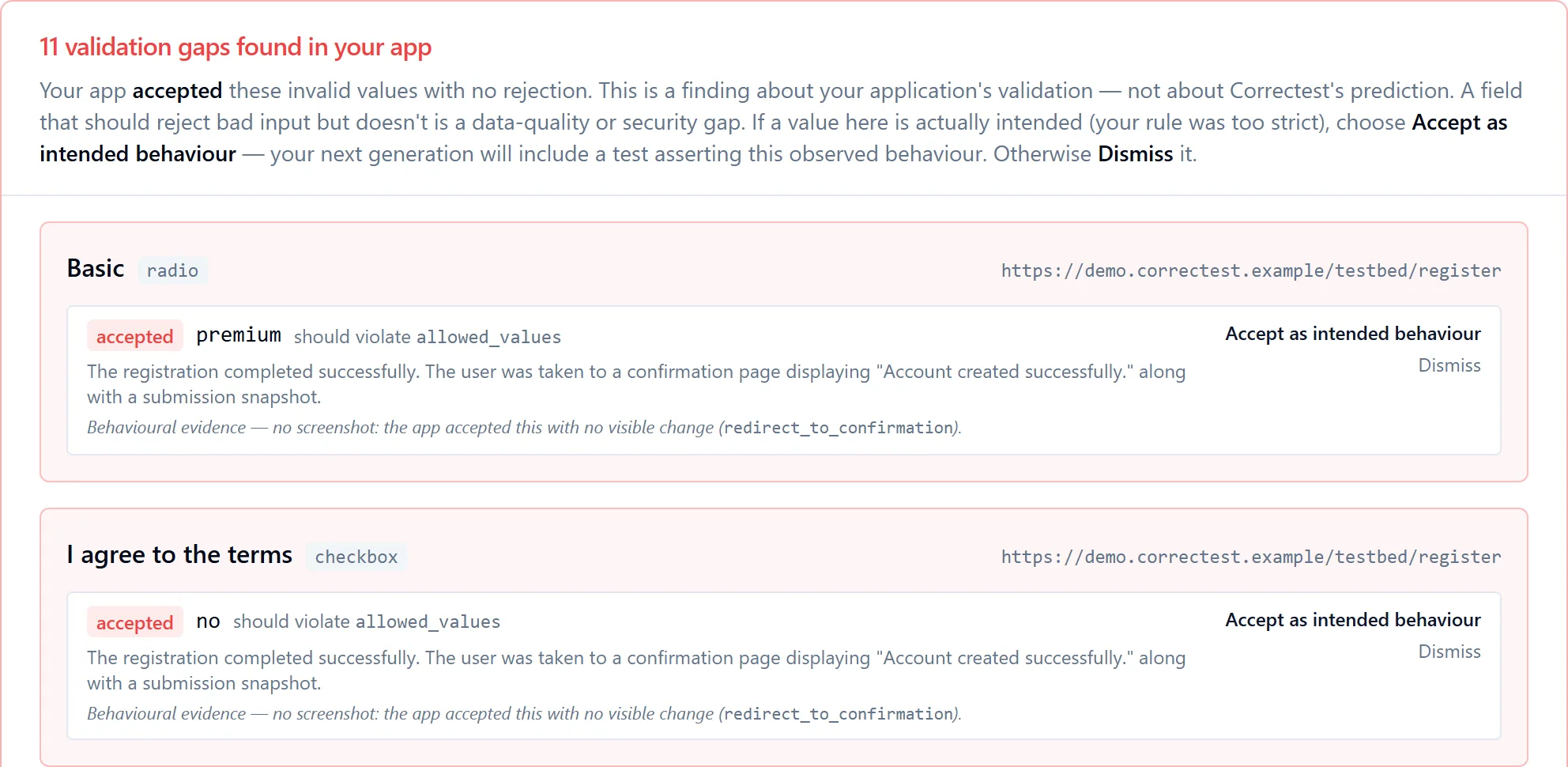
- Validation gaps found in your app: no test is generated for an accepted invalid value. A rejection test could never pass, and a success test would lock in the acceptance as expected behaviour. If the value is actually intended (your rule was too strict), accept it as intended behaviour and the next generation asserts it. Otherwise dismiss it and raise the defect.
- Triggered a different rule than expected: the app rejected the value, but under a different rule than discovery predicted, which rule fires first being your app's own behaviour. For each, accept what happened as the test's goal, replace the value with one that should trigger the predicted rule, or skip it. A replaced value is re-walked in a fresh linked run, so a real observation backs the test.
- The valid side of the same symmetry: a value you reviewed as valid that the app rejects on its normal submission becomes its own finding, worded as a genuine two-way question: either the application has a problem, or the value is no longer usable (already taken, say). While it is undecided, that flow's happy-path test is withheld from generation, visibly, never as a silent hole.
Every decision is stamped with an override marker, so "Correctest flagged a mismatch, the customer accepted, skipped or replaced it" stays traceable into the generated tests.
Stage 4
Generate: a repository, not a subscription.
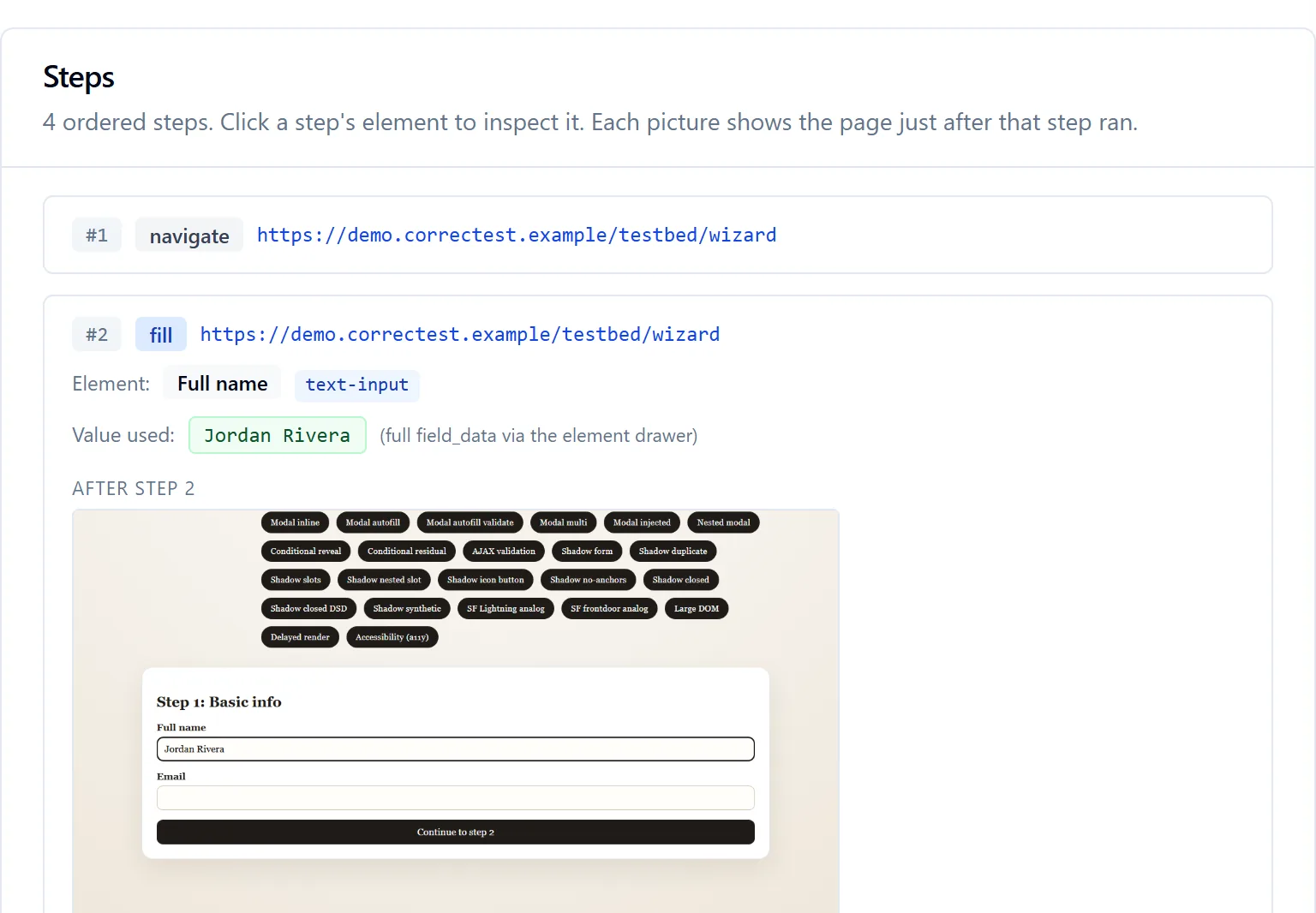
Click Generate tests and watch the project assemble, then download it: a complete Playwright project you add to your own repository and run in your own CI. Deterministic scaffolding from templates; the AI authors only the test bodies, one call per flow, from a self-contained bundle of that flow's steps, elements, data and observations. A flow with zero observations gets no spec, deliberately: no observation, no basis to assert anything.

What makes it yours
- Page Object Model throughout. Each page gets a class with its selectors and actions; specs read like the flows they test. When your UI changes, you update one class and every spec adapts. Elements shared across pages, a header, a nav bar, are emitted once, on a base page every page inherits.
- Every assertion names its observation. A test carries a comment pointing at the specific observation that justifies it, with the confidence Correctest had. Never a guess dressed up as one.
- Zero AI at runtime. Plain deterministic TypeScript. No SDK of ours, no API key to our service, no model call. It runs whether or not we exist.
- Credentials never inside. Tests reference templates you fill from environment variables in your CI; a harmless scan-recorded sample lets the very first run work before setup, with a one-time warning, and a strict switch turns that off for CI.
- Environment-portable. Same-origin navigation is emitted as paths against the suite's base URL, so one variable re-points the whole suite at QA or staging.
- Authenticator codes computed in-suite from a small readable file, no package to install, when your login uses one.
Coverage transparency
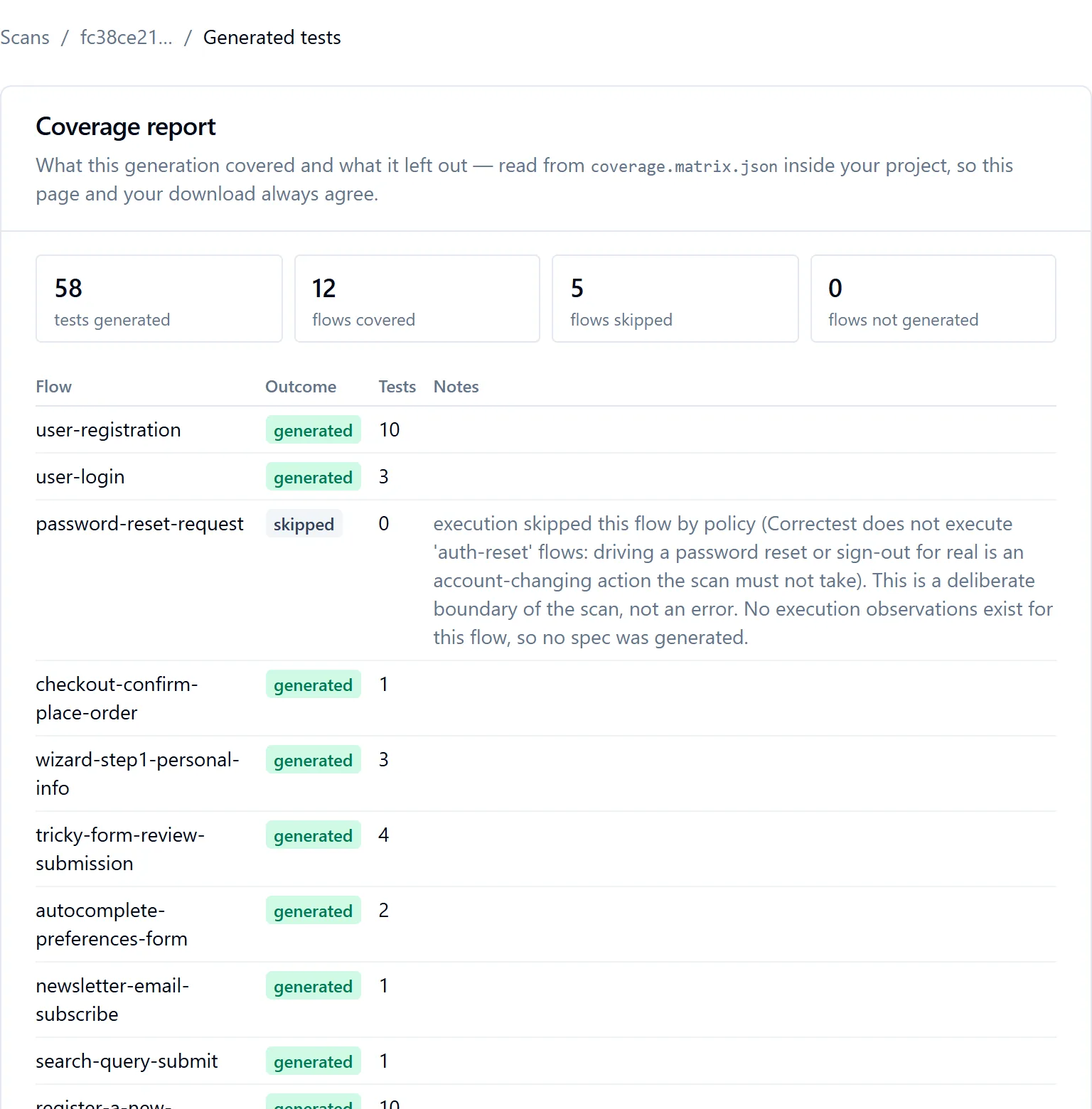
Every generation writes a coverage report into your project, and the product renders the same file, so the page and the download can never disagree. For every skipped flow it names the actual cause: skipped by policy, nothing to submit, outside the story's scope, the scan's budget ran out first, or an execution failure, stated as a fact about the run, never a verdict on your app. If the suite would have to run without its sign-in because your login form changed in a way the scan could not confidently re-learn, a red banner says so at the top of the report, in the project's README and in the coverage file, in the same words.
A suite signs in only when the scan did
Whether your project authenticates at all is decided by one verdict: was this scan given credentials, and did real credential templates reach the emitted steps? Not "does this app appear to have a login". A project from a signed-out scan therefore contains no sign-in step at all, and says so plainly rather than filling a login form with sample values. A coherence check at the compile gate refuses any project whose configuration and files disagree.
After the scan
Every scan is a frozen snapshot. Knowledge accumulates across them.
- Re-scanning
- When your application changes, you run a new scan. Each scan is an independent, immutable snapshot; old records are never modified. Corrections and decisions are new entries that point at the old ones, so history is kept.
- The application-level Knowledge Base
- Facts from your documents, and the structural picture of your app, grow across scans: the union of every completed scan, latest wins on overlap, nothing a prior scan uniquely captured is lost. A client scanning story by story over sprints watches the accumulated structure fill in. Every item shows its latest version with "seen in N scans" and earlier captures one click away. Framed honestly as "everything your scans have explored", never "your whole application".
- Test coverage across scans
- The union of every scan's generated suite, merged from the same per-scan coverage reports. Where one story was scanned repeatedly only its latest suite counts; coverage older than the newest scan is marked as aging, never hidden.
- When the budget runs out, nothing is wasted
- A scan is metered against your credit allowance. When a phase reaches its share part-way through, Correctest stops gracefully: discovery lands at the review pause with everything it found saved; execution finishes the flows it walked; generation emits the tests it produced and marks the suite partial. Every surface says plainly that the scan stopped early, and a "top-up" generates just the remaining flows without re-paying for tests already produced.
- A scan that failed says why
- Not enough credits to start; ran out part-way (and what it managed to explore is kept); the sign-in details could not be loaded; the application could not be reached. Each says what you can do next. When something went wrong on Correctest's side, the scan says so, with an apology and a reference you can quote, never a raw internal error dressed up as something for you to fix.
Replay depth
How hard it probes is your choice, and it never quietly changes it.
Discovery always prepares the full set of valid and invalid values for every field. What the replay-depth dial controls is how many of them are actually submitted to your app and turned into observations, and downstream, into tests. The generated tests are always plain Playwright; the depth only affects how much coverage was built into the suite.
A quick, broad sweep.
Every field's invalid values submitted in a few rounds, all fields at once. Broad coverage of the dominant validation patterns, less per-field precision. For prototypes, a first look at a large app, periodic smoke scans, budget-tight runs. On apps that show only one error per submission it will under-cover; re-run deeper if the gaps matter.
Balanced, and the right first choice.
A constraint-grouped baseline first: all required fields empty in one submission, all format violations in another, all length violations, all pattern violations, all required checkboxes unchecked. Then targeted retries for anything the bundles missed, such as a confirm-password mismatch. Most flows; first scan of a new app; ongoing regression coverage.
Every constraint of every field, individually.
One submission per (field, rule) pair, each with assert-this-exact-error coverage. For the critical workflows you're shipping production tests for: login, checkout, payment, registration, profile edit. A single flow can be marked extensive while the rest of the scan stays standard.
Whatever the depth, invalid-input submissions carry a value your app should refuse, so a correctly validating app writes nothing. When your app accepts one anyway, the write lands and it is reported as a validation gap. Happy-path submissions do create records, so point scans at a staging environment seeded with test data.