We ran Correctest against the test application we build it with: one evening, two scans, no edits, no retakes. Everything below happened in the order shown, and every screenshot is the product's own screen from that evening.
Screenshots are of Correctest scanning its own test application on a development stack. Only our account email and the host name were replaced; nothing the product reported was altered. Times are local, and run in sequence through a single evening.
5:18 PM01 · Documents
First, we gave it what we already knew.
Fifteen documents, straight from the folder: user stories in Markdown, Gherkin and a Jira-style CSV export; business rules as a PDF; a glossary; an API spec; a data dictionary. Each became facts the scan could later check. Fourteen were read into facts before anything touched the application.
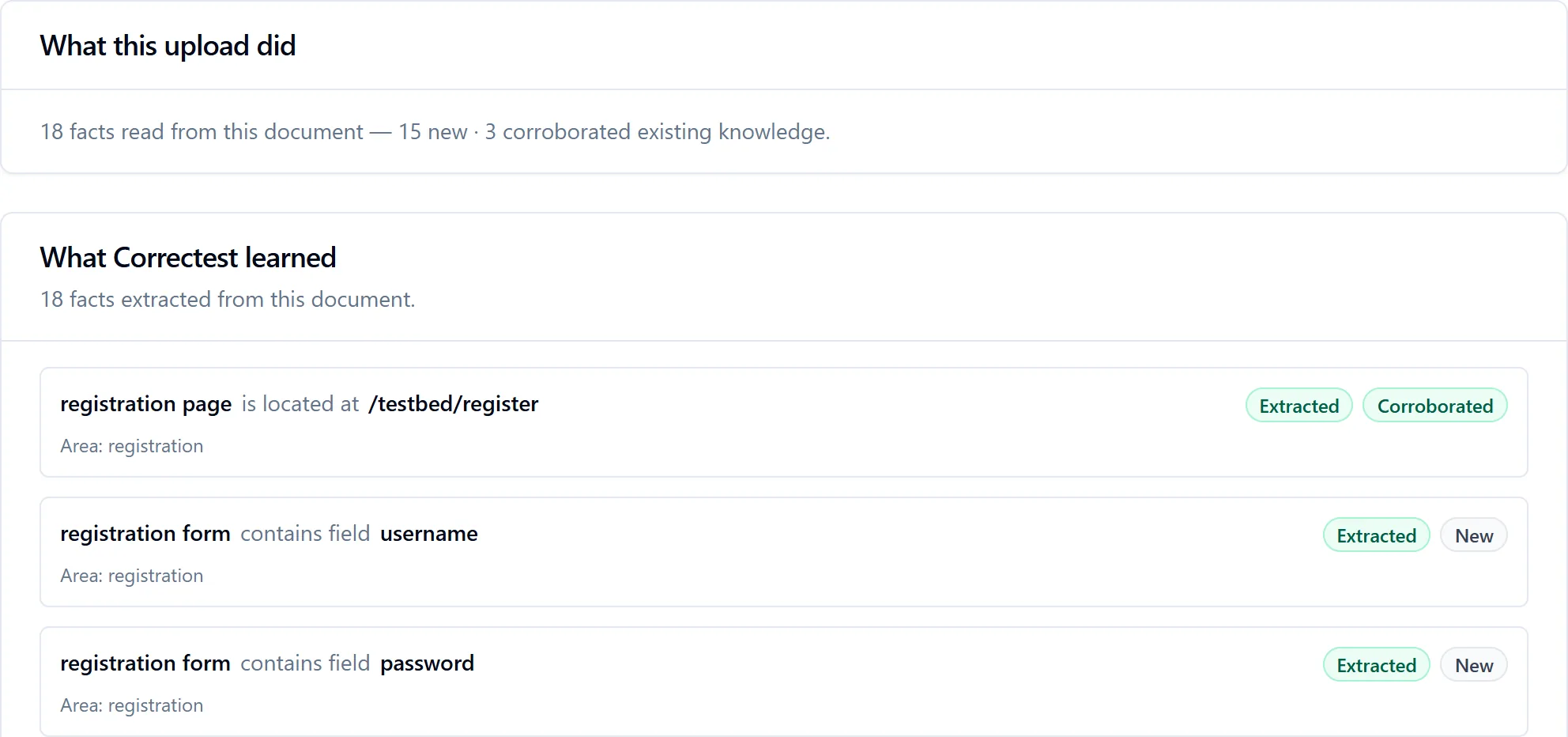
account-registration.md, seconds after upload. Eighteen facts read; three of them already known from the glossary uploaded minutes earlier, and marked corroborated. Nothing has touched the app yet.
5:39 PM02 · Discovery
Then we pointed it at the app.
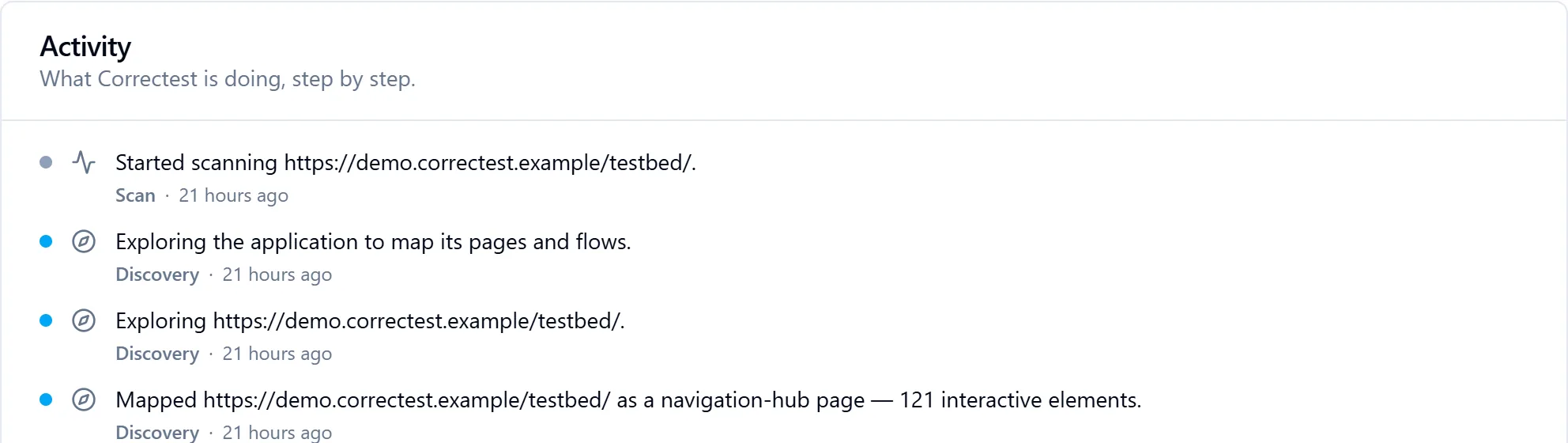
No login, no sitemap, no hints. Discovery narrates what it maps as it maps it: the index page, classified as a navigation hub with 121 interactive elements; then page after page, until 27 pages and 17 flows were in the knowledge base.
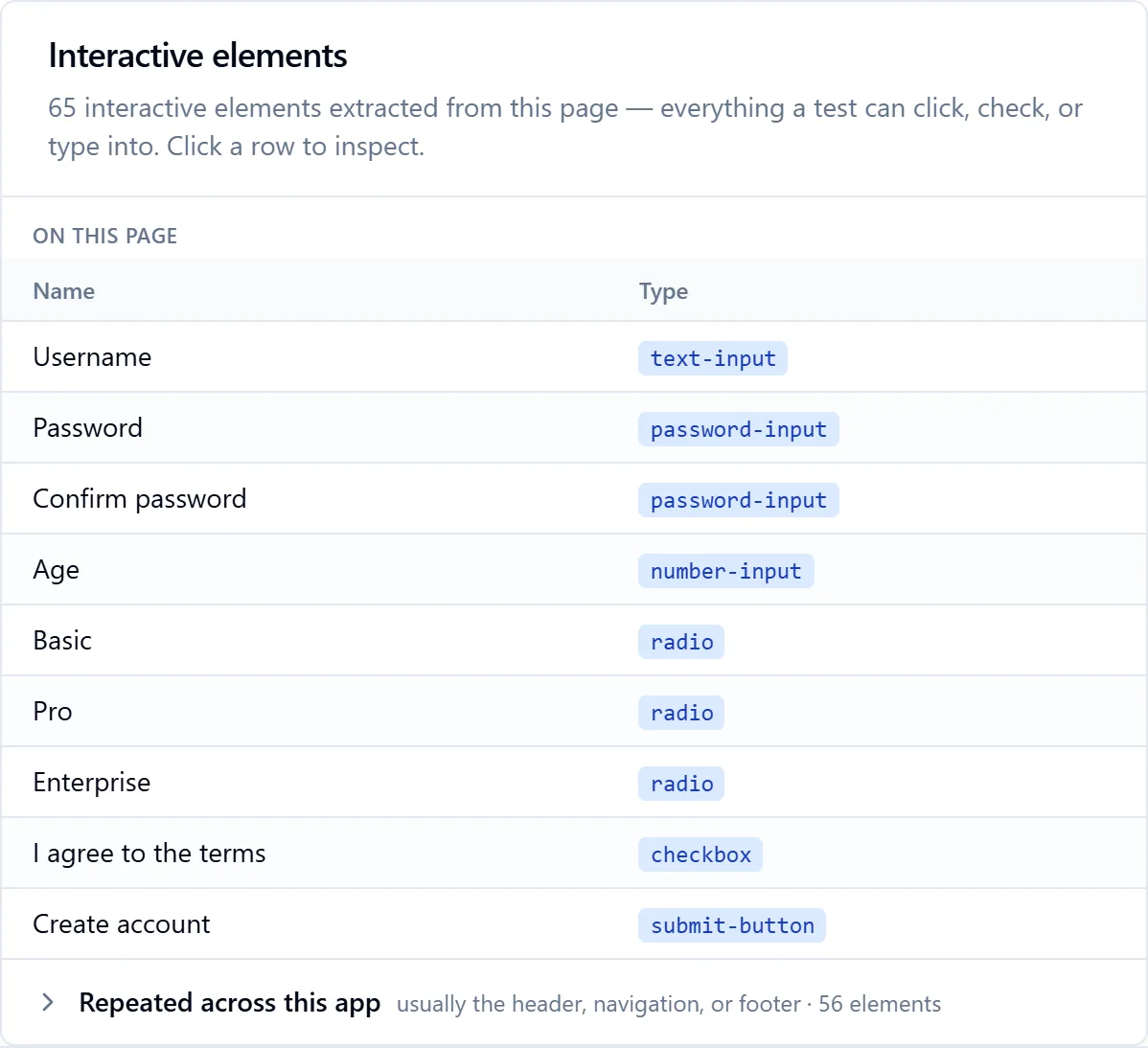
The activity feed, two minutes in.One of the 27, the registration form. 65 interactive elements, each typed; the 56 that repeat across the app (header, navigation, footer) folded away. Every page gets one of these.
5:59 PM03 · Review
It stopped, and showed its homework.
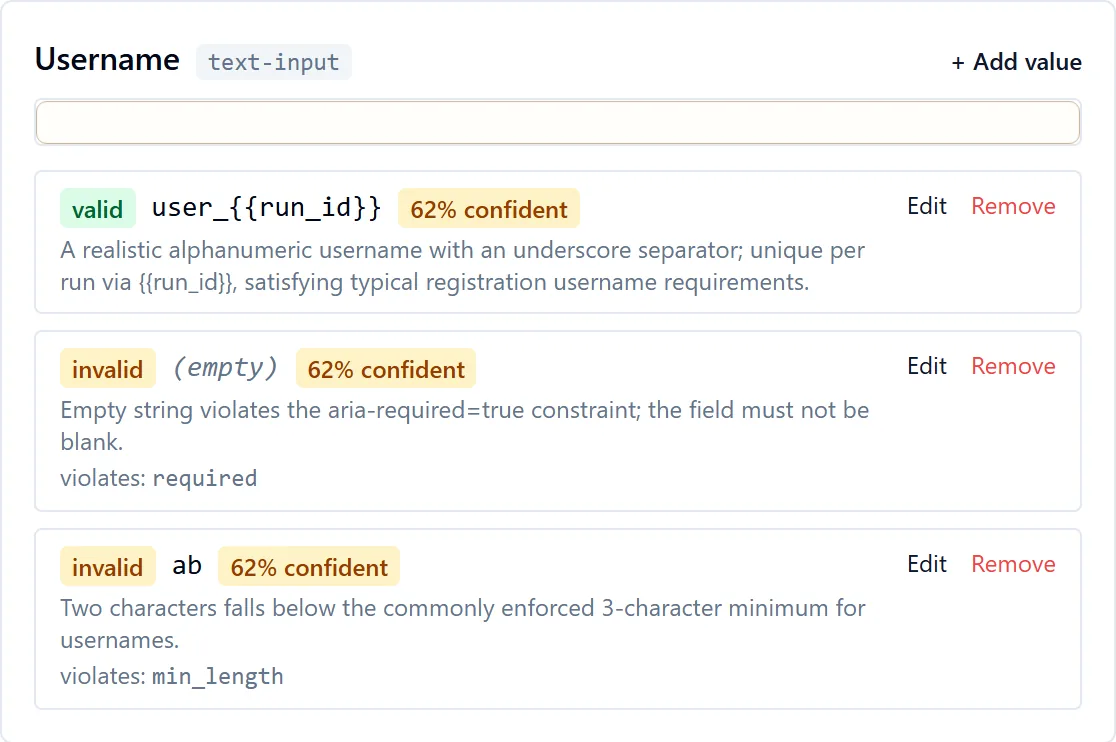
Before submitting a single form it paused for review: 47 fields, 47 valid values and 113 invalid ones it had prepared, each with a confidence score and a written reason. Three values it wasn't sure about, and said so. You can edit, remove or add any of them. Nothing runs until you say so.
One field on the review screen, captured on a paused scan of the same app. A valid value, two invalid ones, the rule each is meant to break, and the reasoning, in plain English.
6:00 PM04 · Replay
It submitted, and wrote down what the app said.
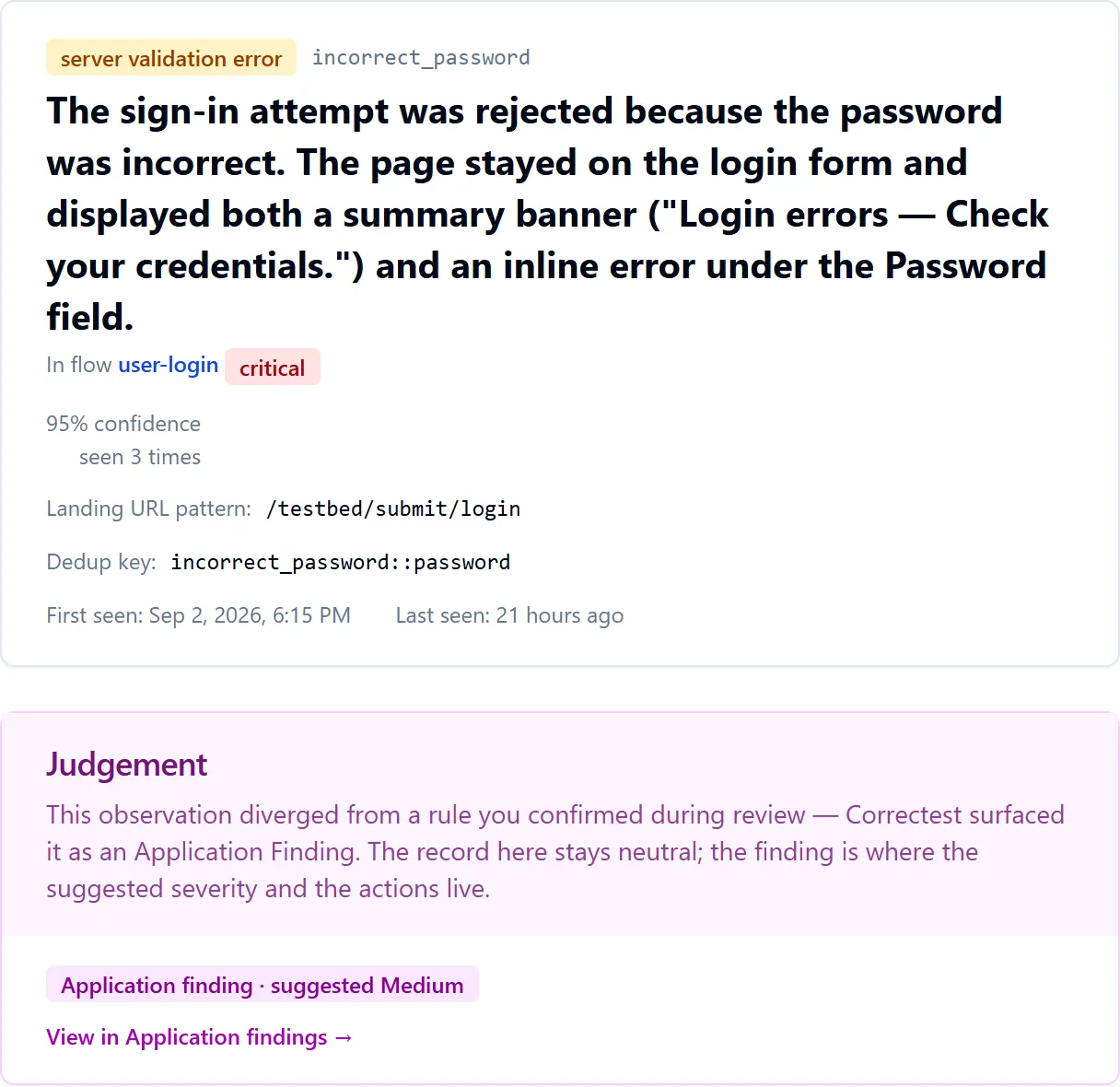
Seventeen flows, sixty-three observations. Each record holds what was submitted, what the app answered, verbatim, and how sure Correctest is. The judgement stays neutral: it records; you decide.
One observation record. A wrong password, rejected; 95 % confidence; seen three times; and a judgement panel that says, in the product's words, "the record here stays neutral."
“Correctest learns your application; it never judges it.”If your form accepts a malformed email, the record says so, flagged for your attention, not silently "fixed". You decide what's a bug and what's a feature.
6:19 PM05 · Findings
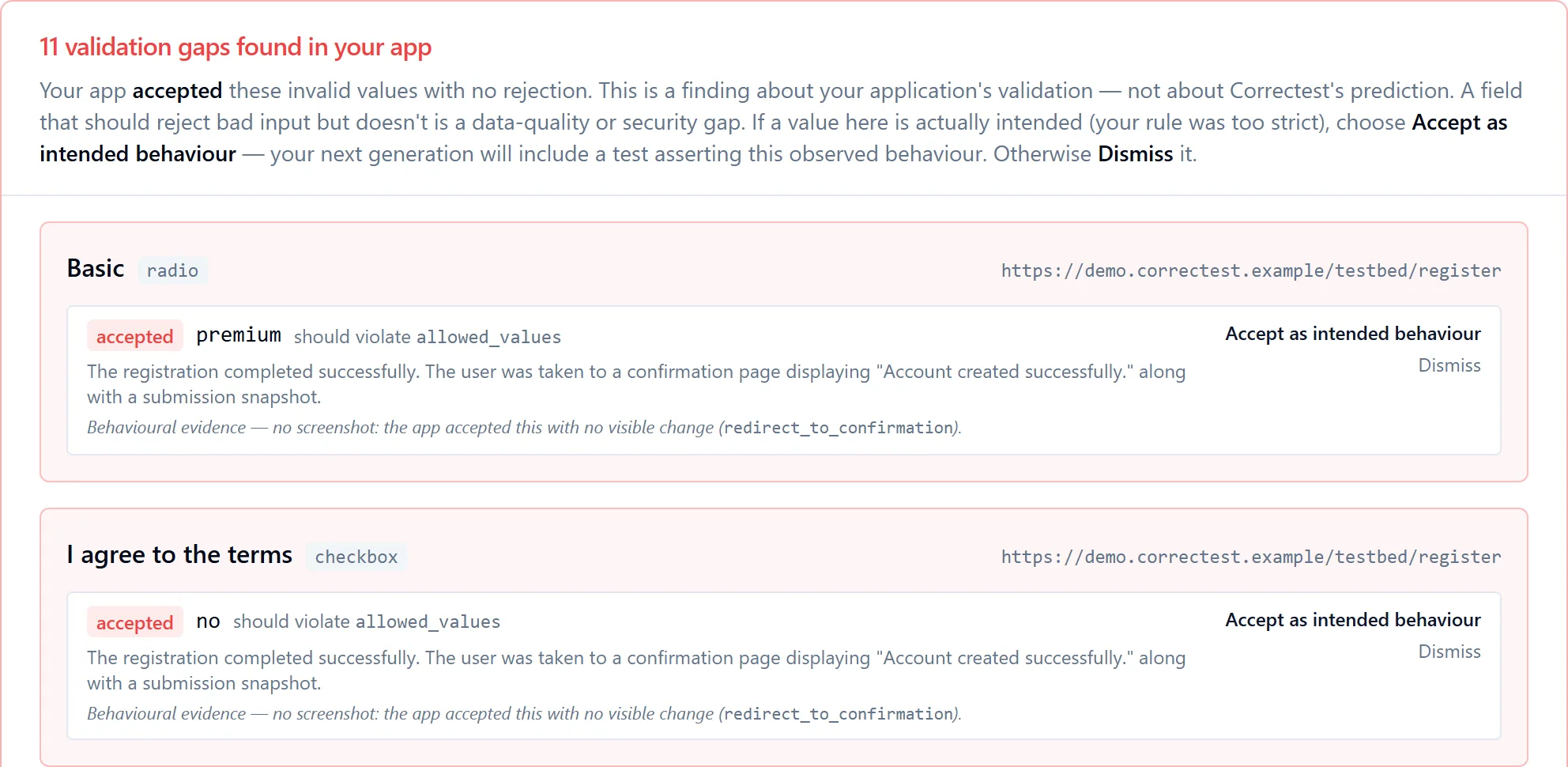
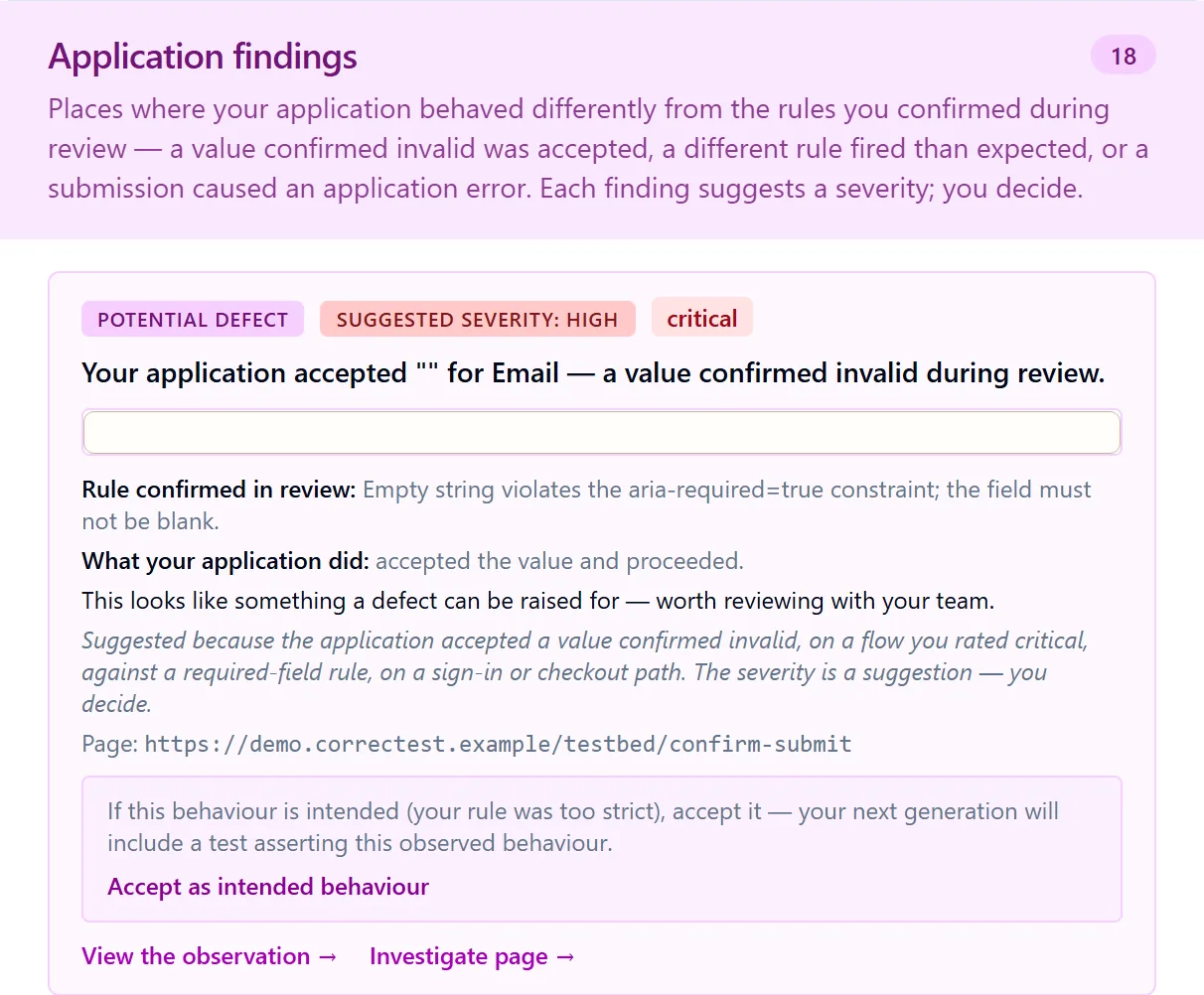
It found eleven things our app accepted that it shouldn't have.
A postcode field took NOTAPOSTCODE!. A terms checkbox took no. An email field took nothing at all. None of these become tests that would quietly pass; each is held out as a finding until you decide what it means.
The results screen. In the product's words: "This is a finding about your application's validation — not about Correctest's prediction."Blind spots are listed, not averaged away. Eighteen application findings, each with a suggested severity you can overrule.
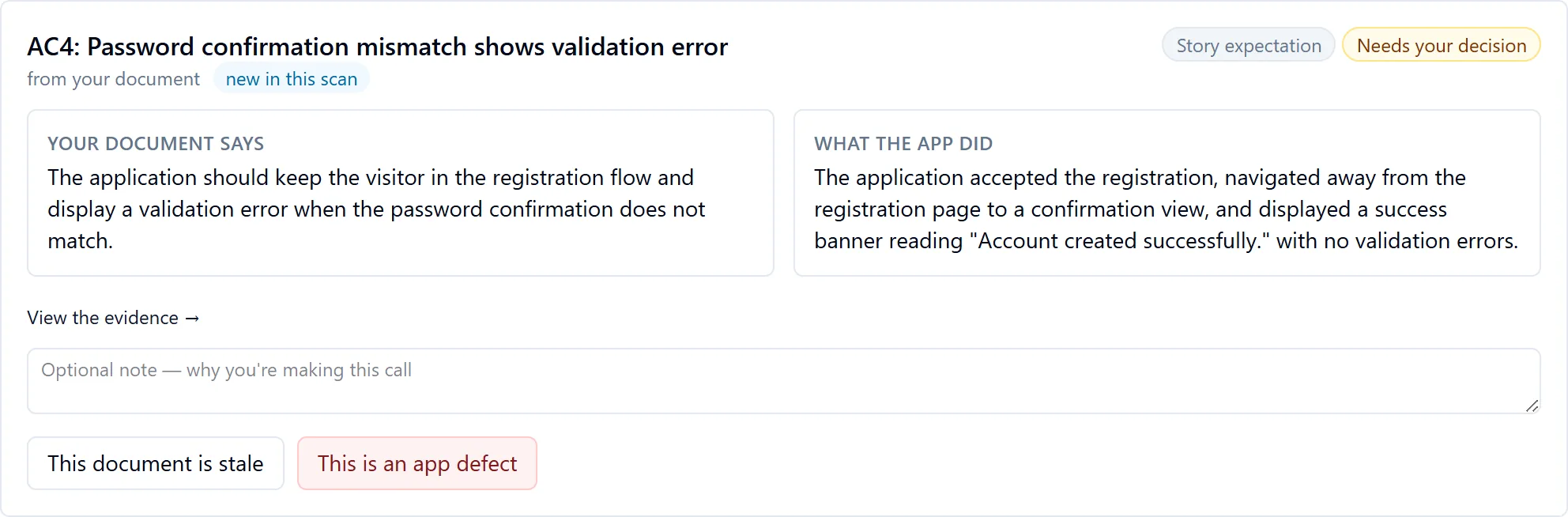
It also found our own story disagreeing with our own app. Three times.
The registration story from 5:18 PM says a mismatched password confirmation, an under-age visitor and a reserved username are each rejected. The app accepted all three registrations. Correctest put document and app side by side and asked which one is wrong.
Document versus app, one decision at a time. "This document is stale" or "This is an app defect". Correctest never picks for you.
6:32 PM06 · Repository
It handed us a repository.
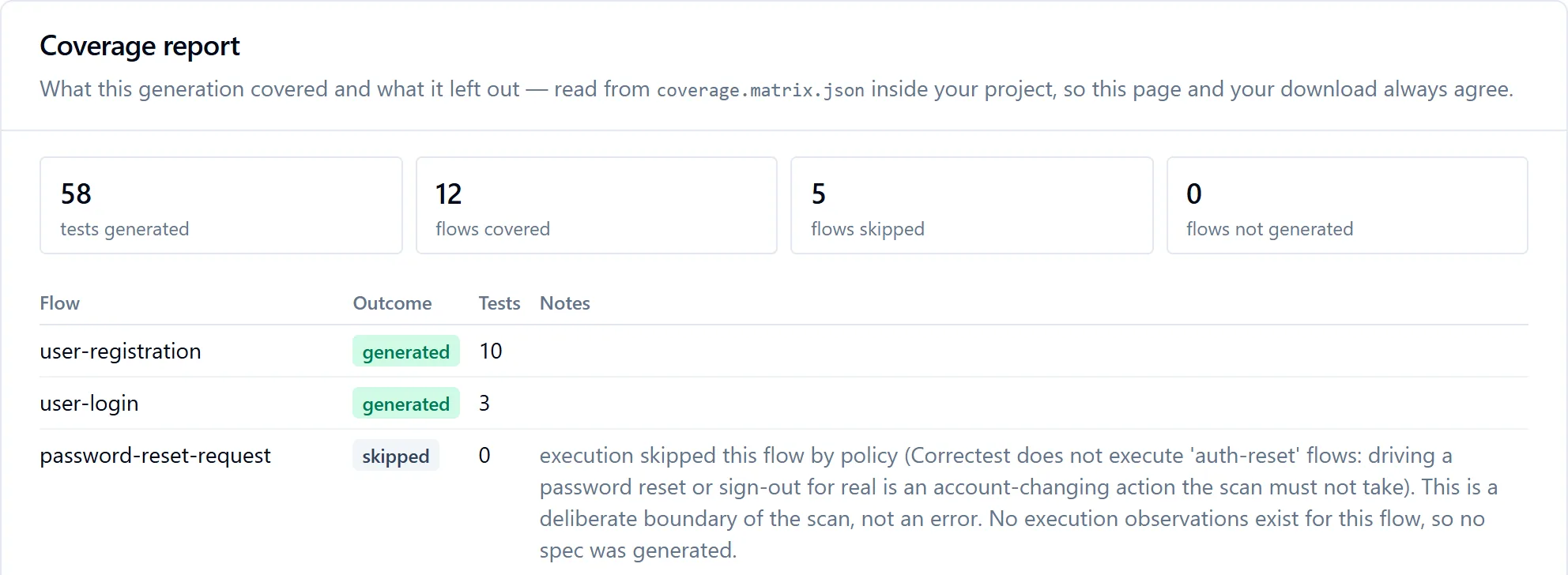
58 tests across 12 flows, as a plain Playwright project: page objects, specs, fixtures, a CI workflow. Every test names the observation it is grounded in. Five flows were skipped, and the coverage report says why, including a password reset it refused to drive for real.
One click, one repository.What was left out, and why. "A deliberate boundary of the scan, not an error."
// tests/flows/autocomplete-preferences-form.spec.ts — first test of two, as generated
import { test, expect } from "@playwright/test";
import { resolveCredentials, resolveFixedTestData, recordCreatedTestData } from "../shared/fixtures";
import { TestbedAutocompletePage } from "../pages/TestbedAutocompletePage";
import data from "../pages/TestbedAutocompletePage.data.json" with { type: "json" };

test.describe("autocomplete-preferences-form", () => {
  /**
   * Asserts the happy path: valid city + postcode saves location
   * preferences and navigates to the submission confirmation page with
   * a "Location preferences saved." banner.
   * Grounded in observation: 52f4f5ce-7952-432a-8efa-1deea36387cc
   * (confidence 0.95).
   */
  test("autocomplete preferences success — valid city and postcode save preferences", async ({ page }) => {
    const autocomplete = new TestbedAutocompletePage(page);
    const preferredCity = resolveCredentials(data.valid.preferredCity);
    const postcode = resolveCredentials(data.valid.postcode);
    await autocomplete.goto();
    await autocomplete.fillPreferredCity(preferredCity);
    await autocomplete.fillPostcode(postcode);
    await autocomplete.clickSubmit();
    await expect(page).toHaveURL(/\/testbed\/submit\/autocomplete/);
    await expect(page.locator('div.banner-success')).toBeVisible();
    …
  });
});
A real spec, verbatim. The imports above are the whole dependency list: no SDK of ours, no API key, no model call. It runs whether or not we exist.
testbed/80 files · 58 tests · from scan fc38ce21package.jsondeps pinnedplaywright.config.ts3 browsers + retries.env.examplecredentials as env vars, none baked inREADME.mdwritten for your appcoverage.matrix.jsonwhat was covered, and why not.github/workflows/tests.ymlCI workflowtests/auth.setup.tssigns in oncetests/flows/12 specs, one per flowtests/pages/page objects + datatests/shared/fixtures, helpers
The project, as downloaded. Page Object Model throughout; selectors live in one place.
This scan explored as a signed-out visitor, so the project it produced carries no sign-in step at all: a suite authenticates only when the scan that produced it authenticated, and it says so rather than filling a login form with sample values.
6:56 PM07 · The question
Then we asked it to follow our stories on their own. And it caught us out.
A second scan, signed in as a Customer, walking the acceptance criteria in the documents from 5:18 PM. One story file was out of date: it fills a "full name" field the registration page no longer has. Correctest didn't force the walk through, and it didn't mark the story failed. It stopped, said what it couldn't find, and asked.
The conformance report. "Correctest reports what it observed — it never decides for you which side is right."The moment from the top of this page, as it appeared. Between the question and the choices the card shows a screenshot of where the walk stopped, omitted here. Until you choose, that story's tests are held back: only conformant stories, stories you have accepted as stale, and defects you have resolved go on to generation.
That was our application. The interesting question is what it would find in yours.
One evening, two scans, no edits and no retakes. Eleven fields that accepted what they should have refused, a user story that had quietly gone out of date, and a Playwright suite at the end of it. Your application is not our test application, and the findings will not be the same ones. That is rather the point: the scan reports what your app does, and hands you the decisions.